
Interface only DJI Osmo 360 II – Nayoki Utility Mount
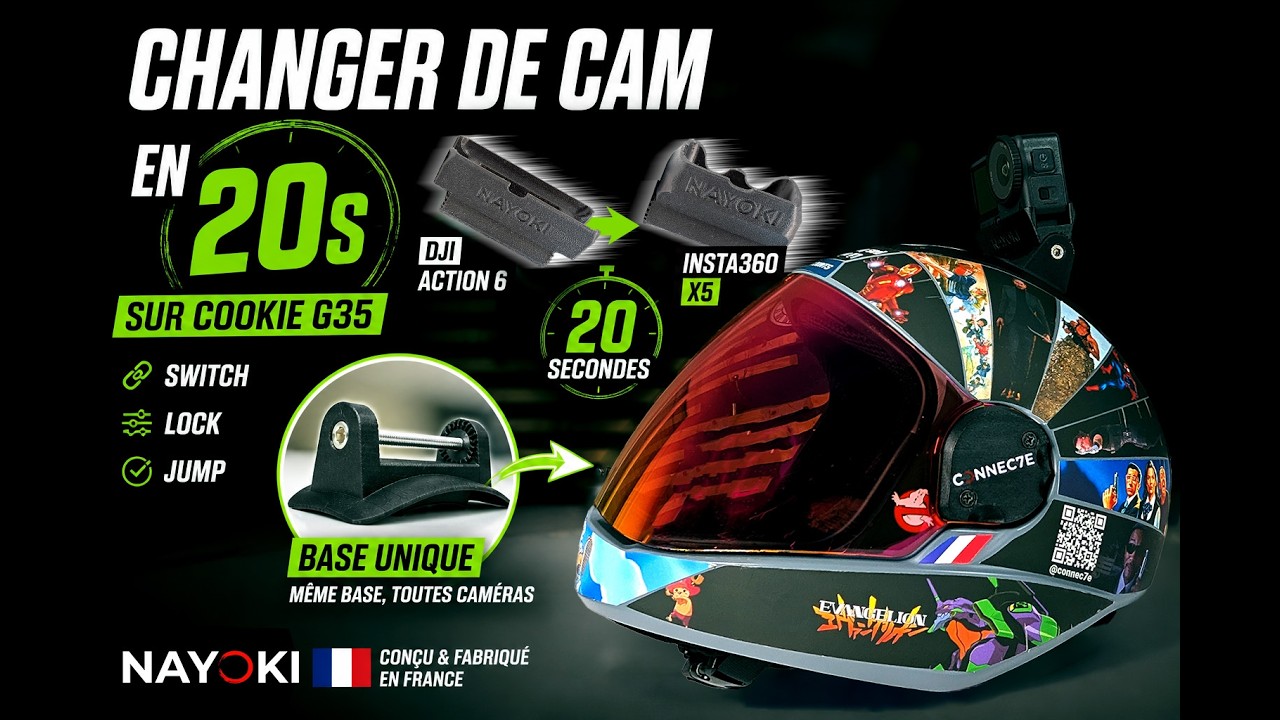



You own a DJI Osmo 360 II And you're already using a Nayoki mount on your skydiving helmet? DJI Osmo 360 II interface only allows you to adapt your 360° camera to your base Nayoki Utility Mount existing. No need to buy all your support again: The basic structure remains the same, the interface changes..
Designed for the DJI Osmo 360 II, This part is 3D printed in my workshop in France and supplied with the 1/4-20 camera mounting screw. It can be replaced without disassembling the base attached to the helmet.
⚠️ This interface alone requires a Nayoki Utility Mount base, not included. If you don't already have one, choose a complete support:
- Nayoki Utility Mount Cookie G35
- Nayoki Utility Mount Cookie Fuel
- Nayoki universal camera mount for skydiving helmets
📷 A dedicated interface for the DJI Osmo 360 II
There DJI Osmo 360 II is a 360° panoramic camera equipped with a 1/4-20 thread. To use it on the Nayoki modular system, you need an interface adapted to the geometry of its case: the interfaces designed for the Insta360 or the DJI Osmo Action are not interchangeable.
This interface for skydiving camera support specifically accommodates the Osmo 360 II. You retain the base, its mounting and the adjustment of the capture angle: only the part connecting the camera to the Nayoki system is replaced.
A simple solution to change cameras without needing multiple mounts on your helmets.
🧩 Compatibility
- Compatible camera: DJI Osmo 360 II exclusively
- System requirements: Nayoki Utility Mount compatible base, sold separately or in a complete pack
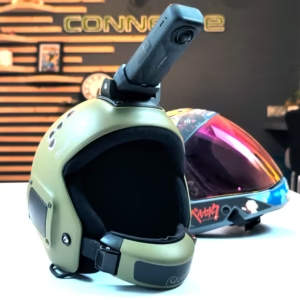
- Compatible headsets via their Nayoki base: Cookie G35, Cookie Fuel and helmets equipped with the Nayoki universal mount
- Camera mounting: screw for standard 1/4-20 thread included
- Attachment to the base: Nayoki Utility Mount modular rosette system
- Other cameras: This interface is reserved for the DJI Osmo 360 II; select a dedicated interface for other models, including the first-generation DJI Osmo 360, the DJI Osmo Action, and the Insta360.
- Not to be confused with: This interface is not the standalone adapter for Cookie Roller Mount or Tonfly 2X Mount System
⚡ Features
- Dedicated interface for the DJI Osmo 360 II, ready to be installed on a compatible Nayoki base
- Part manufactured by 3D printing in PETG or PETG-Carbon, depending on the variant chosen
- Nayoki multi-position rosette : allows you to adjust and then lock the angle with the rosette screw of your base
- Compact geometry, designed to minimize bulk and attachment points
- Design intended for helmet camera mounts for skydiving
- Quality control before shipment
- 1/4-20 mounting screw included for the camera
💡 Key Benefits
✔ Economic Keep your current Nayoki base rather than buying a complete new stand.
✔ Compatible with DJI Osmo 360 II : interface designed for this specific model
✔ Quick camera change : replaces the interface without removing the headset base
✔ Adjustable angle : take advantage of the adjustment positions offered by the rosette of your Nayoki base
✔ Compatible with Cookie G35, Cookie Fuel and Nayoki universal base a shared modular system
✔ Several materials and colors PETG or PETG-Carbon depending on your needs
✔ Made in France and checked before shipment
📦 Manufacturing and materials
- Material : PETG or PETG-Carbon depending on the chosen variant
- Manufacturing: 3D printing in my workshop in France
- Quality control: each interface is checked before shipment
- Made to order: It usually takes 3 to 4 days to manufacture before shipping.
🪛 Installation
- Loosen the rosette screw and remove the old interface from your Nayoki Utility Mount base
- Fix your DJI Osmo 360 II to the new interface using the supplied 1/4-20 screw
- Place the camera and interface assembly on the rosette of your Nayoki base.
- Choose the desired capture angle
- Tighten the rosette screw properly to secure the interface
- Check the entire assembly and test it in a controlled environment before any jump.
🧠 Practical notes
⚠️ The rosette screw is not included in the interface alone. Reuse the one supplied with your Nayoki Utility Mount base. 1/4-20 camera mounting screw is included.
If you have lost the rosette screw, contact me for a replacement.
Angle adjustment: Loosen the rosette, position your camera, then tighten the screw to lock the assembly.
Battery and USB access: Depending on the camera's geometry and the mount's configuration, removing the Osmo 360 II may be necessary to access certain openings. Access without disassembly is not guaranteed on this version.
Use in parachuting: Check the compatibility of your helmet, its base, the tightening and the rules of your center before jumping with a camera.
🎯 Material selection
- PETG (premium): Good mechanical resistance, slight flexibility in the face of impacts, and good resistance to temperature variations. Available in black, white, dark blue, gray, yellow, and red.
- PETG-Carbon (expert): Increased rigidity and a sleek matte black finish. Available in black only.
🧩 The Nayoki modular system
There Nayoki Utility Mount base remains on the helmet. This is the’camera interface that you change when you switch from one model to another. Therefore, you can keep a single base and have several interfaces adapted to your cameras.
Other interfaces available:
- Insta360 X6 Interface
- Insta360 X5 Interface
- Insta360 X4 Air Interface
- Insta360 X4 Interface
- Insta360 X3 Interface
- GoPro Hero 9 to 13 interface
- DJI Osmo Action 6 Interface
🔒 Why is there no STL file for sale?
The Nayoki modular system represents development, prototypes, and camera-specific adjustments. This interface is therefore offered only as a finished product, manufactured and controlled in France, and not in STL file format.
🎬 Additional Information
- Free speed and altitude counter To add your telemetry to your jump videos: access the tool
Created by Connec7e
Designed and manufactured by Connec7e, a French workshop that combines parachuting, 3D printing and functional design.
Fall. Get back up. Create.
DJI Osmo 360 II, Nayoki Utility Mount base and headset not included, sold separately.
You may also like…
-
Nayoki Skydive Camera Mount for Cookie G35 Skydiving Helmet
Price range: 79,00 € to 89,00 € Tax Inc. -
Nayoki Universal Skydive Camera Mount for Parachuting Helmet
Price range: 79,00 € to 89,00 € Tax Inc. -
Nayoki Skydive Camera Mount for Cookie Fuel Skydiving Helmet
Price range: 79,00 € to 89,00 € Tax Inc.
Reviews